




Create AI videos with 240+ avatars in 160+ languages.
Create SCORM-compliant training videos
SCORM (Sharable Content Object Reference Model) is the most widely used eLearning standard for delivering and tracking training content in LMSs (Learning Management Systems).
SCORM defines how courses are packaged, launched, and reported on inside an LMS.
By following this standard, training content created in one authoring tool can be uploaded and used across different LMS platforms without custom integrations.
SCORM remains widely used because it is stable, broadly supported, and well understood by learning teams.
This guide explains how SCORM works, the differences between SCORM versions, and how it is used today.
How SCORM Works
SCORM defines a standard way for eLearning courses to interact with a Learning Management System (LMS). When a learner launches a SCORM course, the LMS knows how to start the content, receive progress data, and record results in a consistent format.
SCORM governs three core parts of eLearning delivery: how content is packaged, how it communicates with an LMS during playback, and how learner data such as completion status, scores, and time spent is recorded. Together, these rules allow LMS platforms to reliably launch courses and generate consistent reports.
1. Content packaging
A SCORM course is packaged as a single ZIP file that contains all course assets along with a manifest file (imsmanifest.xml). The manifest tells the LMS what the course includes, how it is structured, and which file to launch first.
Because every SCORM package follows the same format, LMS platforms can import courses without custom setup.
2. Course launch and communication
When a learner opens a SCORM course, the LMS launches it in a browser window or embedded frame. During playback, the course communicates with the LMS through a standardized JavaScript interface defined by the SCORM specification.
This communication sends updates such as course status, progress, quiz results, and completion or pass/fail data.
3. Tracking and reporting
SCORM defines how learner data is recorded inside the LMS. Depending on the SCORM version, this can include completion status, time spent, scores, and interaction data.
Because this data follows a shared standard, reports remain consistent even when courses are created using different authoring tools.
SCORM 1.2 vs SCORM 2004
SCORM exists in multiple versions, but most organizations today choose between SCORM 1.2 and SCORM 2004. Both follow the same core principles (standardized packaging, LMS communication, and learner tracking), but differ in reporting depth and data limits.
SCORM 1.2 offers the broadest LMS compatibility and is commonly used for basic tracking scenarios. SCORM 2004 supports more advanced reporting, including separate tracking of completion and success, and larger data limits, which are often required for compliance-focused or more complex courses.
The table below highlights the key differences between SCORM 1.2 and SCORM 2004.
In regulated industries such as pharmaceuticals or finance, the ability to track course completion separately from assessment success can be important for audit trails and compliance records.
SCORM 2004 supports this distinction, SCORM 1.2 does not.
What SCORM tracks and reports
SCORM defines a standard set of learner data that courses can send to a Learning Management System (LMS). Depending on the SCORM version and LMS support, this typically includes:
- Completion status – Whether a learner has completed a course (for example, completed or incomplete).
- Pass / fail status – Whether a learner has passed an assessment. In SCORM 2004, this can be tracked separately from completion.
- Scores – Numeric results from quizzes or assessments, often used to determine success thresholds.
- Time spent – The amount of time a learner spends in a course or module.
- Interaction data – Details such as quiz questions, learner responses, and results, with more detailed support in SCORM 2004.
Together, these data points allow learning teams to monitor progress, verify completion, and generate consistent reports across LMS platforms.
When SCORM is useful
SCORM is best suited to learning scenarios where content needs to be delivered consistently through an LMS and tracked in a standardized way. It is commonly used in the following contexts:
- Compliance and regulatory training – Where completion, pass/fail status, and audit-ready reporting are required.
- Onboarding programs – For delivering standardized training to large groups with consistent tracking.
- Role-based or mandatory training – Where learners must complete specific courses as part of their role.
- LMS-centered learning environments – When training is primarily accessed and reported through a Learning Management System.
- Content reuse across platforms – When courses need to be moved between LMSs without rebuilding or reformatting.
- Structured, linear learning programs – Where progress follows a defined path and outcomes are clearly measured.
SCORM is most effective when learning is delivered as a course within an LMS and success is measured through completion, scores, and basic interaction data.
SCORM with Synthesia
Synthesia supports SCORM as a delivery format for video-based training. Videos can be exported as SCORM 1.2 or SCORM 2004 packages and uploaded to any SCORM-compliant LMS.
When exported as SCORM, Synthesia videos behave like standard LMS courses. They can be launched from the LMS, tracked for completion, and included in reports alongside other SCORM-based training content.
How SCORM export works in Synthesia
The diagram below shows how a Synthesia video moves from creation to delivery as a SCORM package inside an LMS.
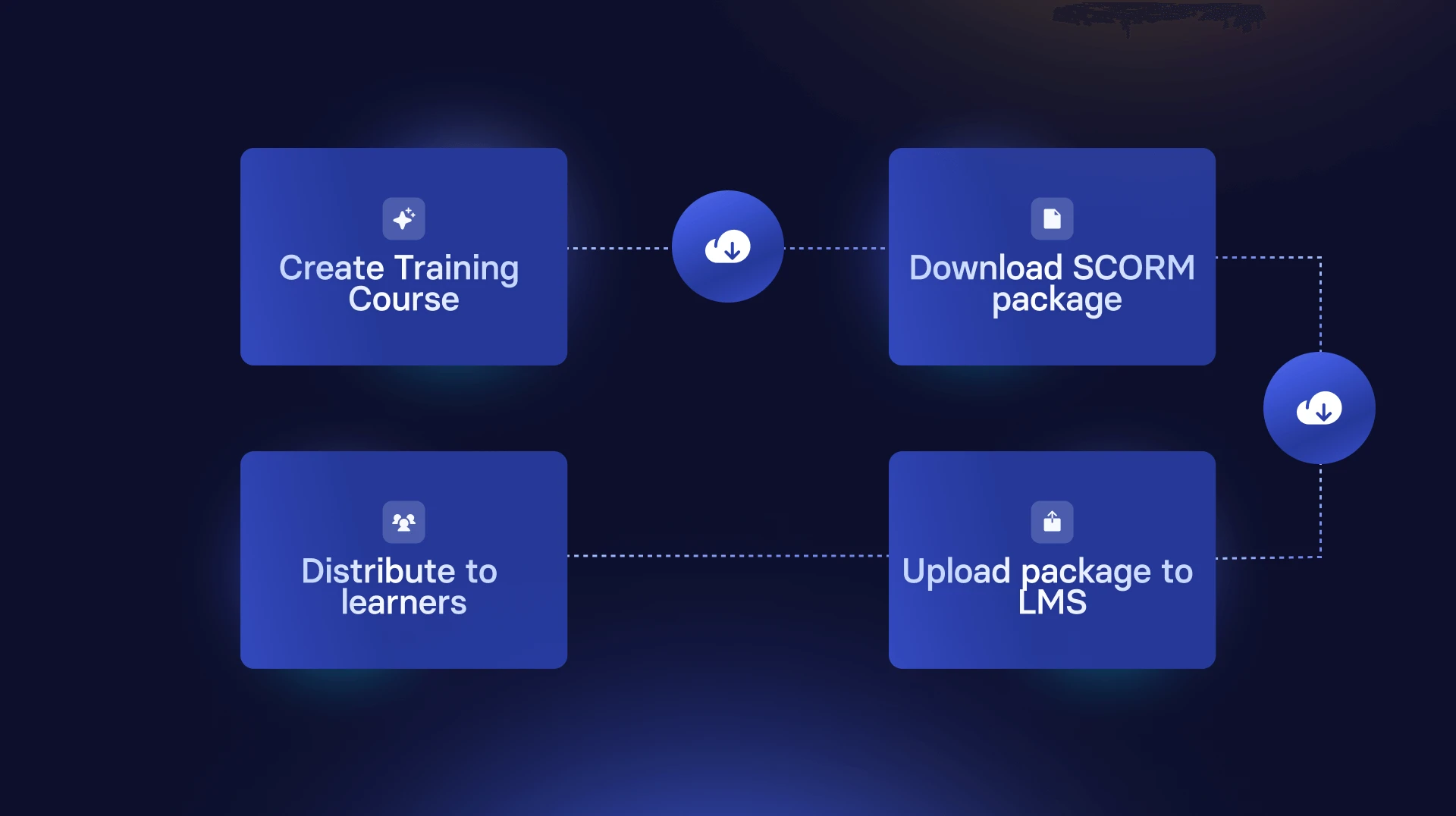
The workflow looks like this:
- Create a training video in Synthesia
- Choose SCORM 1.2 or SCORM 2004 as the export format
- Define completion rules (for example, video watched or finished)
- Download the SCORM package
- Upload the package to your LMS and assign it to learners
Once uploaded, the LMS handles course launch, tracking, and reporting using standard SCORM mechanisms.
Keeping SCORM courses up to date
Traditional SCORM workflows often require re-exporting and re-uploading packages whenever content changes. Synthesia’s SCORM export can embed a dynamic video player, allowing updates to the video content to be reflected in the LMS without regenerating or re-importing the SCORM package.
This approach is commonly used in environments where training content changes frequently or where maintaining version consistency across multiple courses is important.
Multilingual delivery in a single SCORM package
For global training programs, a single SCORM package can support multiple languages. With Synthesia’s multilingual video player, learners can select their preferred language within the same course, while progress and completion are still tracked through the LMS.
SCORM remains widely used because it provides a stable, predictable way to deliver and track structured learning through an LMS. While newer standards exist, SCORM continues to serve as the baseline for organizations that prioritize compatibility, reporting consistency, and operational reliability.
About the author

Strategic Advisor
Kevin Alster
Kevin Alster is a Strategic Advisor at Synthesia, where he helps global enterprises apply generative AI to improve learning, communication, and organizational performance. His work focuses on translating emerging technology into practical business solutions that scale.He brings over a decade of experience in education, learning design, and media innovation, having developed enterprise programs for organizations such as General Assembly, The School of The New York Times, and Sotheby’s Institute of Art. Kevin combines creative thinking with structured problem-solving to help companies build the capabilities they need to adapt and grow.






What is SCORM?
SCORM is a set of technical standards that allow eLearning courses to work consistently across different Learning Management Systems (LMSs) by standardizing how content is packaged, launched, and tracked.
What does SCORM stand for?
SCORM stands for Sharable Content Object Reference Model. It was created to ensure eLearning content can be reused and delivered across different LMS platforms without compatibility issues.
What is a SCORM package?
A SCORM package is a ZIP file that contains course files and an imsmanifest.xml file. This manifest tells the LMS how to launch the course and what learner data to track.
What is a SCORM course?
A SCORM course is any eLearning course that has been packaged according to SCORM standards so it can be uploaded, launched, and tracked in a SCORM-compliant LMS.
What does “SCORM compliant” mean?
A SCORM-compliant LMS or authoring tool correctly supports SCORM standards for launching courses, tracking learner progress, and reporting completion data.
What’s the difference between SCORM 1.2 and SCORM 2004?
SCORM 1.2 offers the broadest LMS compatibility, while SCORM 2004 supports more advanced tracking, sequencing, and reporting. Many organizations choose SCORM 1.2 for simplicity and reach.
Is SCORM still relevant?
Yes. While newer standards like xAPI exist, SCORM remains the most widely supported and reliable option for LMS-based training, particularly for compliance and enterprise use cases.
Can Synthesia export videos as SCORM?
Yes. Synthesia allows you to export videos as SCORM 1.2 or SCORM 2004 packages that can be uploaded to any SCORM-compliant LMS.


